Start with one AWS account

Find your first cloud savings.

Run one local, read-only AWS scan. Get a short list of resources worth reviewing before the next bill.

One account first Read-only by default Keys stay local
Example scan report
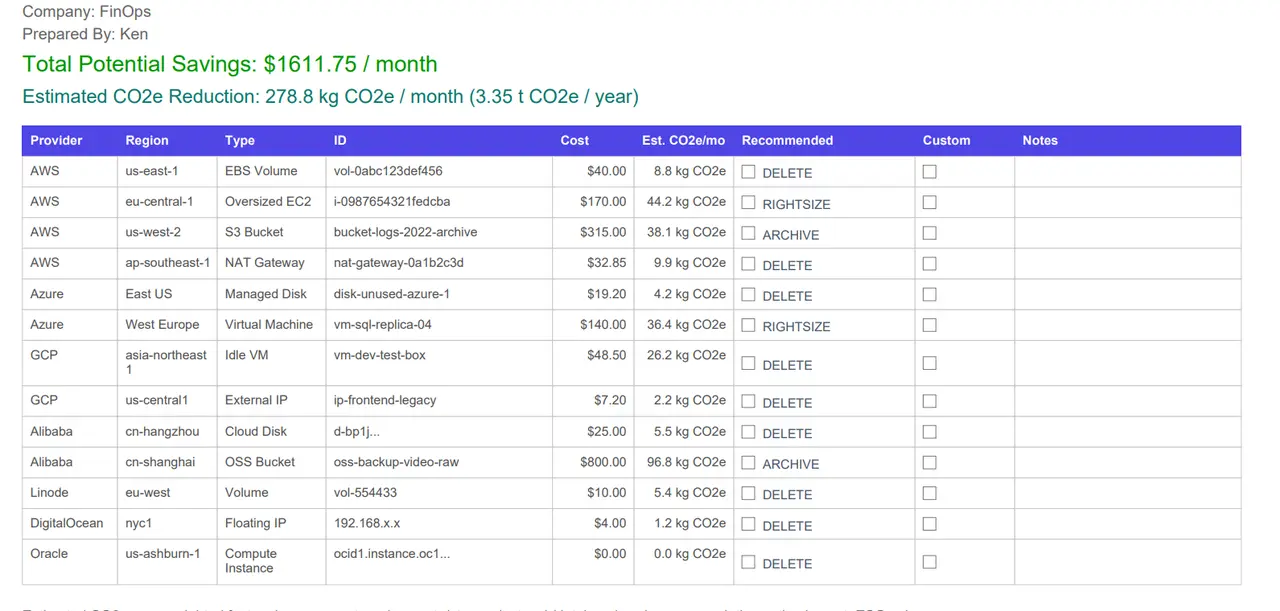
Total potential savings$1,611.75/mo
Estimated CO2e reduction278.8 kg/mo
Export formatPDF / CSV
Cloud Waste Scanner report showing potential savings and a review list of cloud waste findings.
Short review list Read-only first pass PDF / CSV handoff
Local-firstScan data and cloud credentials stay on the operator machine.
Read-only firstFindings are reviewed before any cleanup path is considered.
Export evidenceSend a PDF or CSV when someone asks for proof.
Desktop appWindows, Linux, and macOS builds are ready to try.
What is Cloud Waste Scanner?

A local scanner for fast cloud cost cleanup.

Cloud Waste Scanner is a desktop app that runs read-only scans from your machine and finds cloud resources that may still be costing money. It is built for teams that want a quick cost-saving review without sending cloud credentials to a hosted collector. A first scan produces a short evidence list with resource type, owner hints, usage signals, estimated savings, and exportable proof for cleanup review.

What value does it deliver?

It turns cost suspicion into a review list.

The practical value is speed: instead of digging through every provider console, you can run one narrow scan and see which idle VMs, unattached disks, stale snapshots, unused IPs, or load balancers deserve attention first. The app does not promise blind deletion. It helps your team identify likely savings, confirm evidence, assign an owner, and act before the next billing cycle compounds the waste.

One short loop.

Start with one AWS account and answer one practical question: what should we check before the next bill lands?

01

Connect one AWS account

Use read-only access so the first result is easy to check and explain.

  • Provider setup stays local
  • No hosted collector required
  • Proxy-friendly first run
02

Review the short list

Each finding has enough context to decide whether it is worth a closer look.

  • Idle compute and rightsizing signals
  • Unattached storage and stale snapshots
  • Network resources still billing
03

Export what matters

Share only the findings that need an owner or a decision.

  • PDF and CSV exports
  • Cleanup review notes
  • Team-ready evidence package
What the scan should prove

Clear findings beat bigger dashboards.

A good first scan gives you a short list of resources still costing money, plus enough context for the owner to review them.

Idle VMlow utilization, owner required
EBS Volumeavailable, unattached, monthly cost visible
Elastic IPunassociated, still billing
Snapshotold backup candidate, review retention first

Start with the obvious AWS waste.

Look first for resources that keep billing after projects, tests, and migrations are done.

EC2Idle compute and instances that no longer need to run.
EBSUnattached volumes that continue to incur storage cost.
SnapshotsOld backups that need a retention decision.
Elastic IPsUnassociated addresses that can keep billing.
RDSStopped or oversized database resources to review.
More laterExpand to other providers after the first useful scan.
Start small

Run one AWS scan before the next bill arrives.

Download the app, connect one read-only account, and see which resources deserve a closer look.